lunedì 24 maggio 2021

D365FFO - Fetch mode

 In questo post vediamo il funzionamento della proprietà "Fetch Mode" presente nelle query di AX


Riporto questo link molto utile dove spiega anche altre proprietà:


Ho creato una query con SalesTable + SalesLine + CustTable strutturata così:


Se le relation hanno fetch mode 1:1 e stampiano nell’ordine SalesTable.SalesId, SalesLine.InventTransId, CustTable.AccountNum l’esecuzione darà lugo a questa sequenza: 


 Avremo quindi tutti i buffer di tutte le tabelle valorizzate. Se invece imposto 1:n l’esecuzione da luogo a questo: 


Se invece i datasource delle query sono tutti annidati a cascata così: Quindi non tutti I buffer sono disponibili, per esempio CustTable è disponibile solo all’ultima iterazione,nelle iterazioni 1,2,3 CustTable è vuota.

One2One oppure One2Many non fà differenza


mercoledì 28 aprile 2021

D365FFO Manage Views

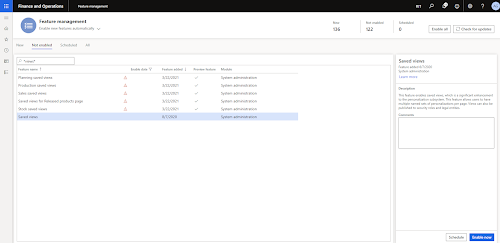
In order to enable the views we need to access the feature management  workspace and to enable  the saved views functions starting from "Saved views" (as reported below).


In order to manage the publishing and administration of views we need to add to our user the role "Saved views administrator".

Then opening the form having grids we can see the function view enabled as reported below.


So modifying the form or the query the system will allow the saving of the view that we have opened in that moment.


We can than manage the views proceeding with the publishing as reported below.


In order to publish the View we have to select it and click on the button Publish as reported below.

While publishing it's possible to define which roles and which companies will be affected by our change.


giovedì 4 febbraio 2021

D365FFO - Deploy report da power shell

 Con questo comando possiamo deployare un report da power shell:

https://community.dynamics.com/365/financeandoperations/b/daxology/posts/options-to-deploy-ssrs-report-in-d365fo

es:

 cd K:\AosService\PackagesLocalDirectory\Plugins\AxReportVmRoleStartupTask  
   
 .\DeployAllReportsToSsrs.ps1 -PackageInstallLocation "K:\AosService\PackagesLocalDirectory" -Module ApplicationSuite –ReportName SalesInvoice.Report  

lunedì 1 febbraio 2021

D365FFO - Report Extension

 In questo post vediamo come estendere un report STD aggiungendo un nuovo parametro alla dialog di lancio. Come nota tecnica aggiungo che la modifica illustrata è valida solo dall'UP23 in poi. Con questo update infatti X++ permette di usare l'attributo [DataMemberAttribute] nelle estensioni:

https://docs.microsoft.com/en-us/business-applications-release-notes/October18/dynamics365-finance-operations/platform-extensibility4

Vedremo due casi, il primo con un report "semplice" che prevede solo DataContract + DataProvider ( ho preso come esempio il report Vendor transaction in AP --> Inquiries and report --> Vendor transaction) , e il secondo caso più complesso che prevede anche controller e la UIBuilder (ho preso come riferimento il libro giornale Italia). Nel secondo caso segnalo questo link che è stato molto utile:

https://community.dynamics.com/365/financeandoperations/f/dynamics-365-for-finance-and-operations-forum/377499/extend-contract-class-in-d365-fo-to-add-a-new-parameter

Per entrambe i casi aggiungeremo alla dialog un flag per decidere se stampare o meno la partita iva in anagrafica:

CASO 1: Vendor transaction:

1) Fare la Coc sulla data contract così:

 [ExtensionOf(classstr(VendTransListContract))]  
 final class LIL_VendTransListContract_Extension  
 {  
   private boolean showVatNum;  
   
   [  
     DataMemberAttribute('showVatNum'),  
     SysOperationLabelAttribute(literalstr("@SYS8946"))  
   ]  
   public boolean parmShowVatNum(boolean _showVatNum = showVatNum)  
   {  
     showVatNum = _showVatNum;  
     return showVatNum;  
   }  
 }  
2) Creare l'estensione della tabella VendTransListTmp ed aggiungere il nuovo campo

3) Duplicare il report  VendTransListReport aggiungendo sul layout il nuovo campo

4) Fare la Coc sulla DP aggiungendo le logiche per popolare il nuovo campo:

 [ExtensionOf(classstr(VendTransListDP))]  
 final class LIL_VendTransListDP_Extension  
 {  
   private boolean showVatNum;  
   
   public void processReport()  
   {  
     vendTable        vendTableLocal;  
     VendTransListContract  contract = this.parmDataContract() as VendTransListContract;  
     VendTransListTmp    vendTransListTmp;  
   
     showVatNum = contract.parmShowVatNum();  
   
     next processReport();  
   
     if(showVatNum)  
     {  
       vendTransListTmp = this.getVendTransListTmp();  
   
       update_recordset vendTransListTmp  
         setting LIL_VATNUM = vendTableLocal.VATNum  
         join vendTableLocal  
         where vendTableLocal.AccountNum == vendTransListTmp.AccountNum;  
     }  
   }  
 }  

5) Estendere il menu item VendTransList Modificando la proprietà "Object" con "LIL_VendTransListReport"

Ristampando il report possiamo notare il nuovo parametro e la nuova colonna popolata


CASO 2: Libro giornale italia:

Oltre a quanto fatto per il caso1, dobbiamo anche:

1) Creare la nostra controller che estenderà (estensione classica in questo caso) la controller standard, cambiando il nome del report:

 class LIL_LedgerFiscalJournalController_IT extends LedgerFiscalJournalController_IT  
 {  
   public static void main(Args _args)  
   {  
     #ISOCountryRegionCodes  
     GlobalizationInstrumentationHelper::featureRunByCountryRegionCodes([  
       [#isoIT, GlobalizationConstants::FeatureReferenceIT00011] ],  
       funcName()  
     );  
   
     LIL_LedgerFiscalJournalController_IT  controller = new LIL_LedgerFiscalJournalController_IT();  
       
     controller.parmReportName(ssrsReportStr(LIL_LedgerFiscalJournal_IT, Report));  
     controller.parmArgs(_args);  
     controller.startOperation();  
   }  
   
 }  

2) Coc sulla classe UIBuilder:

 [ExtensionOf(classStr(LedgerFiscalJournalUIBuilder_IT))]  
 final class LIL_LedgerFiscalJournalUIBuilder_IT_Extension  
 {  
   private boolean             showVatNum;  
   private DialogField           showVatNumDlg;  
   private LedgerFiscalJournalContract_IT contract;  
   
   public void build()  
   {  
     contract = this.dataContractObject() as LedgerFiscalJournalContract_IT;  
   
     showVatNumDlg = this.bindInfo().getDialogField(this.dataContractObject(), methodstr(LedgerFiscalJournalContract_IT, parmShowVatNum));  
       
     next build();  
   }  
   
   public void getFromDialog()  
   {  
     contract = this.dataContractObject() as LedgerFiscalJournalContract_IT;  
   
     showVatNumDlg = this.bindInfo().getDialogField(contract,  
             methodStr(LedgerFiscalJournalContract_IT, parmShowVatNum));  
   
     showVatNum = showVatNumDlg.value();  
   
     next getfromdialog();  
   }  
   
 }  
L'estensione del menuitem LedgerFiscalJournal_IT dovrà avere come object la nuova controller.

Nel caso del libro giornale ho avuto dei problemi alla duplica del report. Durante il deploy veniva segnalato un errore sul numero di parametri: "The number of defined parameters is not equal to the number of cell definitions in the parameter panel" . Non ho ben capito da cosa derivi, ho risolto eliminando i dataset e  il design ricreandoli copiando dallo STD. Ricreando i Dataset a mano, ho anche dovuto ricreare la struttura dei parametri divisi in gruppi come nel report STD:


Ristampando il report possiamo vedere le modifiche:


martedì 12 gennaio 2021

AX 2012 - Matrici

Può capitare a volte di dover lavorare con le matrici.Il seguente job crea una matrice 3x4 di interi in cui l'elemento A[i,j] = i*j e la stampa
 static void LIL_Matrix(Args _args)  
 {  
   int N,M;  
   System.Int32[,] a;  
   int i,j,element;  
   str s;  
   
   N = 3;  
   M = 4;  
   
   a = new System.Int32[N,M]();  
   
   /*
    per inizializzare un Char...
    System.Char c
    c = System.Char::Parse('0');
    */
   
   //inizializza matrice..  
   for(i = 0; i<N; i++)  
   {  
     for(j=0; j<M;j++)  
     {  
       a.SetValue((i*j), i, j);  
     }  
   }  
   
   //stampa matrice  
   for(i = 0; i<N; i++)  
   {  
     for(j=0; j<M;j++)  
     {  
       element = a.GetValue(i,j);  
   
       if(j == M-1)  
       {  
         s+=strFmt("%1",element);  
       }  
       else  
       {  
         s+=strFmt("%1,",element);  
       }  
     }  
   
     s += "\n";  
   }  
   
   info(s);  
 }  

giovedì 17 dicembre 2020

D365FFO - Creare un nuovo worker ed associarlo ad uno user

 In questo post vediamo come creare un worker da associare ad uno user. Ho preso spunto da questo post per AX 2012 adattandolo alle nuove classi aggiungendo la parte che creal'associazione User -> Worker:

https://community.dynamics.com/ax/f/microsoft-dynamics-ax-forum/155550/create-worker-through-code/704763

 public static void CreateEmployeeAndAssignTouser(UserId _userId,  
                  FirstName _firstName,  
                  MiddleName _middleName,  
                  LastName _lastName,  
                  str _email,  
                  HcmPersonnelNumberId _employeeId,  
                  date _joiningDate,  
                  HcmTitleId _title,  
                  SelectableDataArea _ReleaseInCompany  
 )  
   {  
     DirPersonName            dirPersonName;  
     HcmWorker              newHcmWorker;  
     HcmWorkerTitle           hcmWorkerTitle;  
     LogisticsLocation          logisticsLocation;  
     DirPartyContactInfoView       dirPartyContactInfoView;  
     DirParty              dirParty;  
     ValidFromDateTime          employmentStartDateTime;  
     ValidToDateTime           employmentEndDateTime;  
     str                 employeeEmailAdress;  
     HcmPersonnelNumberId        employeeid;  
     RecId                compayRecId;  
     HcmCreateWorkerContract       createWorkerParams;  
     ;  
   
     dirPersonName.FirstName   = _firstName;  
     dirPersonName.MiddleName  = _middleName;  
     dirPersonName.LastName   = _lastName;  
     employeeEmailAdress     = _email;  
     employeeid         = _employeeId;  
     compayRecId         = CompanyInfo::findDataArea(_ReleaseInCompany).RecId;  
   
     employmentStartDateTime = DateTimeUtil::newDateTime(_joiningDate,0);  
     employmentEndDateTime  = DateTimeUtil::applyTimeZoneOffset(DateTimeUtil::maxValue(), DateTimeUtil::getUserPreferredTimeZone());  
   
     if(!HcmWorker::findByPersonnelNumber(employeeid))  
     {  
       createWorkerParams = HcmCreateWorkerContract::construct();  
   
       createWorkerParams.parmDirPersonName(dirPersonName);  
       createWorkerParams.parmPersonnelNumber(employeeid);  
       createWorkerParams.parmLegalEntityRecId(compayRecId);  
       createWorkerParams.parmEmploymentType(HcmEmploymentType::Employee);  
       createWorkerParams.parmEmploymentValidFrom(employmentStartDateTime);  
       createWorkerParams.parmEmploymentValidTo(employmentEndDateTime);  
   
       newHcmWorker = HcmWorker::find(HcmWorkerTransition::newCreateHcmWorkerV2(createWorkerParams));  
   
       dirParty = new DirParty(DirPerson::find(dirPersonName.Person));  
   
       if(employeeEmailAdress != '' && newHcmWorker.Person != 0)  
       {  
         logisticsLocation.clear();  
         logisticsLocation  = LogisticsLocation::create("@SYS5845", NoYes::No);  
   
         dirPartyContactInfoView.LocationName        = "@SYS5845";  
         dirPartyContactInfoView.Locator           = employeeEmailAdress;  
         dirPartyContactInfoView.Type            = LogisticsElectronicAddressMethodType::Email;  
         dirPartyContactInfoView.Party            = DirPerson::find(newHcmWorker.Person).RecId;  
         dirPartyContactInfoView.IsPrimary          = NoYes::Yes;  
           
         dirParty.createOrUpdateContactInfo(dirPartyContactInfoView);  
       }  
   
       if (newHcmWorker.RecId != 0)  
       {  
         ttsBegin;  
         hcmWorkerTitle.clear();  
         hcmWorkerTitle.Worker    = newHcmWorker.RecId;  
         hcmWorkerTitle.ValidFrom  = DateTimeUtil::newDateTime(_joiningDate,0);  
         hcmWorkerTitle.ValidTo   = employmentEndDateTime;  
   
         if(_title)  
         {  
           hcmWorkerTitle.Title = HcmTitle::findByTitle(_title).RecId;  
         }  
   
         hcmWorkerTitle.insert();  
         ttsCommit;  
       }  
   
                //assegna il worker all'utente  
       HcmWorker hcmWorker = HcmWorker::findByPersonnelNumber(employeeid);  
       DirPersonUser::createDirPersonUser(_userId, hcmWorker.Person);  
     }  
   }  

Dopo aver lanciato il job possiamo vedere il risultato:


venerdì 2 ottobre 2020

D365FFO - Dialog per caricare e leggere un file excel

In questo post vediamo come creare una semplice dialog che consente di caricare e leggere un file excel in locale. Ho preso spunto da questo post per creare la classe: 


Questa è la classe che effettua la lettura del file:
 class LILFileExcelDataReader  
 {  
   str     fileURL;  
   str     sheetName;  
   container  dataContainer;  
   
   public static LILFileExcelDataReader construct(str _fileUrl, str _sheetName)  
   {  
     LILFileExcelDataReader instance = new LILFileExcelDataReader();  
   
     instance.parmFileURL(_fileUrl);  
   
     instance.parmSheetName(_sheetName);  
   
     return instance;  
   }  
   
   public str parmFileURL(str _fileUrl = fileURL)  
   {  
     fileURL = _fileUrl;  
   
     return fileURL;  
   }  
   
   private str getTMPSheetName()  
   {  
     return strFmt("TMP_%1_%2",date2str(  
                   today(),  
                   321,  
                   DateDay::Digits2,  
                   DateSeparator::None,  
                   DateMonth::Digits2,  
                   DateSeparator::None,  
                   DateYear::Digits4  
                   ),timeNow());  
   }  
   
   public str parmSheetName(str _sheetName = sheetName)  
   {  
     sheetName = _sheetName;  
   
     return sheetName;  
   }  
   
   public container getData()  
   {  
     return dataContainer;  
   }  
   
   private boolean validate()  
   {  
     boolean ret = true;  
   
     if(!this.parmFileURL())  
     {  
       return checkFailed("@SYS91305");  
     }  
   
     if(!this.parmSheetName())  
     {  
       return checkFailed("@GEE33476");  
     }  
   
     return ret;  
   }  
   
   public void read()  
   {  
     System.Byte[] byteArray;  
     System.IO.Stream   stream;  
   
     try  
     {  
       if(!this.validate())  
       {  
         throw error("@SYS93835");  
       }  
   
       stream = File::UseFileFromURL(this.parmFileURL());  
       //this.fillSheetList(stream);  
       dataContainer = this.readExcelData(stream);  
     }  
     catch(Exception::Error)  
     {  
       info(strFmt("%1 %2",Exception::Error,fileUrl));  
     }  
   }  
   
   public static List fillSheetList(System.IO.Stream   _stream)  
   {  
     OfficeOpenXml.ExcelWorksheets  workSheets;  
     OfficeOpenXml.ExcelWorksheet  sheet;  
     List    sheetList = new List(Types::String);  
     OfficeOpenXml.ExcelPackage   package = new OfficeOpenXml.ExcelPackage(_stream);  
   
     workSheets = package.get_Workbook().get_Worksheets();  
   
     var enumerator = workSheets.GetEnumerator();  
   
     while (enumerator.MoveNext())  
     {  
       sheet = enumerator.Current as OfficeOpenXml.ExcelWorksheet;  
   
       sheetList.addEnd(sheet.Name);  
     }  
   
     return sheetList;  
   }  
   
   private container readExcelData(System.IO.Stream   _stream)  
   {  
     OfficeOpenXml.ExcelWorksheet  _worksheet;  
       
     OfficeOpenXml.ExcelPackage   package = new OfficeOpenXml.ExcelPackage(_stream);  
     int               iRowCount,iCellCount;  
     anytype             anyData;  
     container            conRow,  
                     conData;  
     try  
     {  
       if(package)  
       {  
         //copy data to temporany sheet  
         _worksheet = package.get_Workbook().get_Worksheets().Copy(this.parmSheetName(),this.getTMPSheetName());  
         var cells = _worksheet.get_Cells();  
         iRowCount = _worksheet.get_Dimension().get_End().get_Row();  
         iCellCount = _worksheet.get_Dimension().get_End().get_Column();  
   
         for (int i=2;i<=iRowCount;i++)  
         {  
           conRow = conNull();  
   
           for (int j=1;j<=iCellCount;j++)  
           {  
   
             anyData= cells.get_Item(i, j).get_Value();  
   
             if(!anyData && j ==1)  
             {  
               break;  
             }  
   
             if(anyData)  
             {  
               conRow += anyData;  
             }  
             else  
             {  
               conRow += "";  
             }  
           }  
   
           if(conRow)  
           {  
             conRow += iRowCount;  
             conData = conIns(conData,i,conRow);  
           }  
         }  
       }  
     }  
     catch (Exception::CLRError)  
     {  
       throw error("@SYS135884");  
     }  
   
     return conData;  
   }  
   
 }  

Questa classe RunBase mostra come utilizzarla:

 class LILExcelReaderDialog extends RunBase  
 {  
   str       fileUrl;  
   str       sheetName;  
   
   DialogRunbase  dialog;  
   
   FormBuildStringControl sheetNameCtrl;  
   
   DialogField   dlgSheetName;  
   
   container    dataContainer;  
   
   #define.CurrentVersion(1)  
   #define.Version1(1)  
   #localmacro.CurrentList  
     sheetName  
   #endmacro  
   
   public container pack()  
   {  
     return [#CurrentVersion,#CurrentList];  
   }  
   
   public boolean unpack(container _packedClass)  
   {  
     Integer   version   = RunBase::getVersion(_packedClass);  
   
     switch (version)  
     {  
       case #CurrentVersion  :  
         [version,#CurrentList] = _packedClass;  
         break;  
       default :  
         return false;  
     }  
   
     return true;  
   }  
   
   protected boolean canRunInNewSession()  
   {  
     return false;  
   }  
   
   private str getSessionID()  
   {  
     return strFmt("%1_%2",date2str(  
                   today(),  
                   321,  
                   DateDay::Digits2,  
                   DateSeparator::None,  
                   DateMonth::Digits2,  
                   DateSeparator::None,  
                   DateYear::Digits4  
                   ),timeNow());  
   }  
   
   public void sheetName_lookup(FormStringControl _executionControl)  
   {  
     if(!fileUrl)  
     {  
       warning("Please upload a file first!");  
   
       return;  
     }  
   
     List  valueList = LILFileExcelDataReader::fillSheetList(File::UseFileFromURL(fileUrl));  
   
     FormRun lookupForm = classFactory.createSysLookupPicklist(_executionControl);  
     lookupForm.init();  
       
     sysPickList pickList = new sysPickList(lookupForm);  
     lookupForm.choices(list2Con(valueList));  
     _executionControl.performFormLookup(lookupForm);  
   }  
   
   public Object dialog()  
   {  
     dialog = super();  
     FormBuildButtonControl buttonControl;  
     DialogGroup       dlgGroup;  
     FormBuildGroupControl  buttonGroup;  
     #resAppl  
     ;  
   
     dlgGroup    = dialog.addGroup("@SYS7764");  
     dlgGroup.columns(1);  
   
     buttonGroup  = dialog.formBuildDesign().control(dlgGroup.formBuildGroup().id());  
     buttonControl = buttonGroup.addControl(FormControlType::Button, "@ElectronicReporting:Upload");  
     buttonControl.text("@DMF1951");  
     buttonControl.registerOverrideMethod(methodStr(FormButtonControl, clicked),  
                       methodStr(LILExcelReaderDialog, uploadClickedEvent),  
                       this);  
   
     dlgSheetName = dialog.addFieldValue(extendedTypeStr(Name),   sheetName, "Sheet name");  
     sheetNameCtrl = dlgSheetName.fieldControl();  
     sheetNameCtrl.extendedDataType(extendedtypenum(Name));  
     sheetNameCtrl.registerOverrideMethod(methodStr(FormStringControl, lookup),  
                       methodStr(LILExcelReaderDialog, sheetName_lookup),  
                       this);  
   
       
     return dialog;  
   }  
   
   private void uploadClickedEvent(FormButtonControl _formButtonControl)  
   {  
     FileUploadTemporaryStorageResult result = File::GetFileFromUser() as FileUploadTemporaryStorageResult;  
   
     if (result && result.getUploadStatus())  
     {  
       result.getFileContentType();  
       fileUrl = result.getDownloadUrl();  
   
       info("@DMF1952");  
     }  
   }  
   
   Public void  readExcel()  
   {  
     LILFileExcelDataReader fileExcelDataReader = LILFileExcelDataReader::construct(fileUrl,sheetName);  
     fileExcelDataReader.read();  
   
     dataContainer = fileExcelDataReader.getData();  
   }  
   
   public boolean validate(Object calledFrom = null)  
   {  
     boolean ret;  
     
     ret = super(calledFrom);  
   
     if(ret && !fileUrl)  
     {  
       ret = checkFailed(strFmt("@MCR11498",fileUrl));  
     }  
   
     if(ret && !sheetName)  
     {  
       ret = checkFailed(strFmt("@SYS26332","@ElectronicReportingForAx:ExcelSheet"));  
     }  
    
     return ret;  
   }  
   
   protected void update()  
   {  
     //Metti quì le logiche...
     //La variabile dataContainer è un container di container che contiene tutti i valori
   }  
   
   public void run()  
   {  
     Voucher   voucher;  
     int     i;  
     container  line;  
     str         s;  
     #OCCRetryCount  
           
   
     if (!this.validate())  
     {  
       throw error("@SYS18447");  
     }  
   
     this.readExcel();  
   
     this.update();  
   }  
   
   public static LILExcelReaderDialog construct()  
   {  
     return new LILExcelReaderDialog();  
   }  
   
   public boolean getFromDialog()  
   {  
     sheetName   = dlgSheetName.value();  
   
     return super();  
   }  
   
   public boolean runsImpersonated()  
   {  
     return true;  
   }  
   
   public boolean init()  
   {  
     return true;  
   }  
   
   public static void main(Args _args)  
   {  
     LILExcelReaderDialog excelReaderDialog = LILExcelReaderDialog::construct();  
   
     if(excelReaderDialog.prompt())  
     {  
       excelReaderDialog.runOperation();  
     }  
   }  
   
 }  

La dialog si presenta così: